 Sonde
SondeDocs · Using SondeFox
SondeHub integration
SondeHub Live is available in current private builds as an explicitly activated, foreground-only network source. It can request active sondes, recent observations and recovery reports around the viewed map area and subscribe to selected flights. The selected network policy applies; reading does not enable telemetry uploads. Older builds differ. See the current privacy disclosure for the request, viewport and location details.
SondeHub Live is available in current private builds as an explicitly activated, foreground-only network source. It can request active sondes, recent observations and recovery reports around the viewed map area and subscribe to selected flights. The selected network policy applies; reading does not enable telemetry uploads. Older builds differ. See the current privacy disclosure for the request, viewport and location details.
What SondeFox reads from SondeHub
Working Read-only; each path has its own activation and network rules.
The read side in current private builds includes:
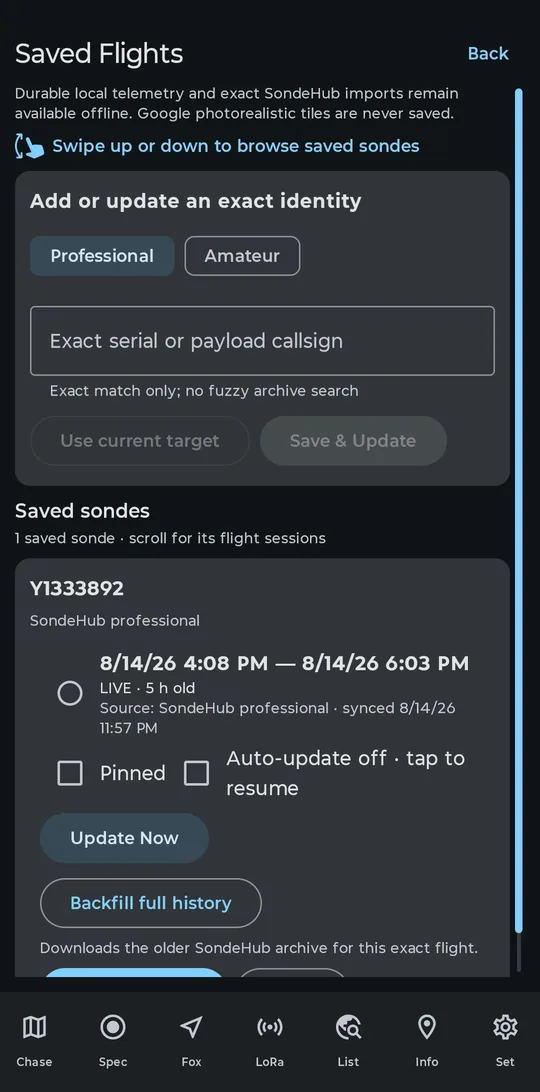
- Exact and recent flight history, for Saved Flights. Save a sonde's exact serial (professional) or payload callsign (amateur) and the app fetches that flight's history from the SondeHub archive, keeps it updated, and can backfill the full record. It is exact-match only; the screen's own hint reads "Exact match only; no fuzzy archive search". If you enable Auto-update for a saved flight, Android may make its network-constrained refresh requests in the background about every 15 minutes.
- Landing predictions. With "Predict where it will land (SondeHub)" enabled in Settings (off by default), a running local chase polls the community predictor (
GET /predictions) for eligible radiosonde targets every 30 s, 1 min or 5 min and draws the predicted descent path and landing marker on the Chase map. Offline, or for a serial SondeHub does not know, the app falls back to a local linear estimate labelled "local est.". - SondeHub Live. After you select the source, review its disclosure, and choose network access, the app makes bounded discovery requests and subscriptions in a temporary foreground session. See below and the current privacy disclosure.
None of these read paths turns on telemetry, station-position, chase-car, recovery, or developer-capture uploads. Those remain separately controlled as described below.
Following a flight you are not receiving
Saved Flights is the way to watch a SondeHub flight with no SDR attached and no local decode: a sonde still over the horizon, a flight a friend is chasing, or a launch you want to review after the fact.
- Find the identity
Look the flight up on sondehub.org (professional) or amateur.sondehub.org (amateur) and copy the exact serial or payload callsign.
- Open Saved Flights
On the Chase tab, expand the below-map controls with the chevron and tap Saved Flights. The same button exists on the List tab.
- Save the identity
Under "Add or update an exact identity", pick the Professional or Amateur chip, type the serial or callsign exactly, then tap Save & Update. A typo produces an empty card, not an error; there is no fuzzy search.
- Sync it
Update Now fetches the recent history. Backfill full history downloads the older archive for that exact flight. Auto-update is off until you enable it; while enabled, Android may run network-constrained refresh requests in the background about every 15 minutes, and a flight still in the air carries a LIVE label.
- Watch it
View on Chase draws the flight on the map in place of live content, with playback at 1×, 5×, 20× or 60×.
Remote updates default to Wi-Fi only; the first update on cellular asks for consent. Imported history stays usable with no connection. As the screen itself puts it: "Durable local telemetry and exact SondeHub imports remain available offline."
What SondeFox can upload, if you opt in
Every upload path is off by default and stays off until you enable it under Set > SondeHub. Uploads also require a station callsign; there is no anonymous upload. A status row in the same section shows last sync time, upload counts, throttle state, and the last error.
Telemetry upload
Off by default Opt-in + callsign required Exact SondeHub mapping required
With "Upload decoded telemetry" on and a callsign set, SondeFox can contribute decoded frames to the network (PUT /sondes/telemetry). Starting in v0.14.14, it no longer carries a per-protocol validation rollout list. Instead, the client structurally considers every genuine radiosonde type with an exact SondeHub mapping, then requires CRC, a confirmed strict identity, valid GPS time and position, freshness, and plausibility before a record can leave the device. SondeHub's server-side denylist makes the final protocol-acceptance decision, so operators can change acceptance for those exact-mapped types without requiring an installed-app update.
RS92 remains client-blocked because SondeFox has only an approximate RS41 mapping for it. Meisei has no valid exact SondeHub mapping, and generic LMS6 cannot yet distinguish SondeHub's 400 and 1680 MHz variants; both remain blocked and their roadmap decoders emit nothing anyway. APRS, WSPR, Meshtastic/LoRa, C50, and Unknown are local-only. Other unimplemented roadmap decoders also emit no telemetry. Decoder badges still report validation evidence: Validated and In validation remain different statuses even when both have an exact mapping eligible for the strict upload path.
The upload path is built to be a well-behaved network citizen:
- CRC-valid frames only. Garbage never leaves the device, so your station does not pollute the public stream.
- Strict identity and telemetry gates. The sonde identity must be confirmed under that decoder's strict rules; GPS time and position must be present, fresh, and plausible. A type must be a genuine radiosonde with an exact SondeHub mapping.
- Server policy is authoritative. SondeHub can accept or deny an exactly mapped protocol server-side. A denial does not relax any client gate and is not retried as though it were a transient network failure.
- 15 s batching. Frames are queued and flushed every 15 seconds, the minimum cadence SondeHub asks uploaders to keep, instead of hitting the API per frame.
- Rate-limit backoff. On HTTP 429 the app honors the server's
Retry-Afterheader and re-queues the batch rather than retrying blindly. - Callsign required. Uploads are tied to a station identity you choose.
- Station metadata. The Receiver and Antenna fields in Settings travel with decoded telemetry as
uploader_radioanduploader_antenna. Contact email is not a decoded-telemetry field; it is used only in the listener-position documents described next.
Station position and chase-car position
Cleared 2026-08-01
Sending your own position to SondeHub is governed by two separate toggles, each off by default. "Station position upload" reports a receiver document (PUT /listeners; the similarly named GET /listeners/telemetry is the read side, a different endpoint). That document contains your effective listener position (GPS by default; manual only when Station position upload is also enabled and manual coordinates are selected), callsign, SondeFox software name and version, a mobile flag, configured radio and antenna metadata, and your configured contact email; a non-personal placeholder is used when the email is blank. "Chase-car position upload" sends the same document with mobile=true so you appear as a chase station on the public SondeHub map; the fixed-station form uses mobile=false. One clearance covers both; it was granted on 2026-08-01. Turning on telemetry upload does not turn either of these on.
Recovery reports
Working
The Recovered button opens a dialog that files a recovery report (PUT /recovered) with the sonde serial, recovery coordinates including altitude, your callsign or reporter name, recovered/not-found status, notes, SondeFox as the recovery-software identifier, and a planned-status flag (currently false). From sonde details, those coordinates use the phone's current GPS fix when available and otherwise fall back to the sonde's shown position; the chase control uses the shown sonde position. The dialog displays latitude and longitude before submission. Nothing is sent until you confirm; every report is a manual, one-off action. Filing a report requires the telemetry opt-in and a callsign, the same as any other upload. Reports tell the community which sondes are already accounted for.
One boundary worth stating: the development capture toggles under Set > Development record SondeHub-shaped payloads for debugging, but they upload only to the developers' private debug server, never to SondeHub. Their "Dry-run captured payloads on SondeHub" button is held in this build and returns an error by design.
SondeHub Live foreground preview (debug only)
Explicit opt-in Foreground session
SondeHub Live is available in current private builds as an explicitly activated, foreground-only network source. It can request active sondes, recent observations and recovery reports around the viewed map area and subscribe to selected flights. The selected network policy applies; reading does not enable telemetry uploads. Older builds differ. See the current privacy disclosure for the request, viewport and location details.
In that debug preview, discovery follows the map you deliberately view, not an automatic device-location query. At broad zooms the app requests one bounded /sondes?last=600 snapshot, then ranks it around the viewed centre locally; it does not send that centre or open a realtime connection. At closer zooms it sends the viewed centre and search radius to SondeHub, obtains one secure MQTT endpoint, and subscribes to at most twenty-four selected exact sondes/{serial} topics. The map never follows a balloon automatically; following is a separate choice and can make later viewport queries reflect your approximate location.
Current native 3D camera reports do not drive debug-preview discovery: without an owner-approved ground-viewport calibration, that path returns no viewport and fails closed. Use the 2D map to choose the discovery area.
The debug session is temporary and fail-closed. It stops when the app leaves the foreground, archive playback begins, network policy denies access, a safety cap is exceeded, or you return to Local SDR. Network points stay in memory, do not enter the local-RF Sondes list or Saved Flights, and do not gain local signal or upload status. The preview does not itself upload telemetry, listener, chase-car, or recovery data; a separately active local SDR chase can continue under its own upload settings until you stop it.
SondeHub publishes no numeric operator quota for this client, and the pinned MQTT client does not negotiate WebSocket compression. The SondeFox Test debug build therefore enforces local request, message, byte, queue, and reconnect limits and fails closed instead of falling back to wildcard subscriptions or repeated global polling.
Offline behavior
Decoding is fully local, so losing signal bars does not end a chase. SondeFox caches the last known target and prediction and keeps navigating; when the connection comes back, any queued telemetry still within the upload window is flushed automatically, and Saved Flights imports remain readable throughout. In the SondeFox Test debug build, SondeHub Live pauses while offline and does not turn its in-memory points into saved history; production authority is off, so there is no Network Live session to pause.
Privacy: exactly what leaves the device
The model is strict: nothing uploads to SondeHub without opt-in.
| Data | When it leaves the device | Default |
|---|---|---|
| Saved Flights exact history | Read-only API requests after you save an exact identity and request an update or enable Auto-update. Auto-update may issue network-constrained background requests about every 15 minutes, following your Wi-Fi-only or cellular choice. SondeHub sees ordinary request metadata such as your IP address. | Manual; Auto-update off |
| Landing predictions | Read-only predictor requests for eligible radiosonde targets during a running local chase, only while "Predict where it will land (SondeHub)" is enabled | Off |
Decoded telemetry for a genuine radiosonde type with an exact SondeHub mapping, with your callsign, radio/antenna metadata, and, when a recent GPS fix exists, your receiver's own position at full resolution (uploader_position) |
Only after you opt in to uploads and set a callsign, and only after CRC, confirmed strict identity, GPS time/position, freshness, and plausibility gates pass. The receiver position is gated by this telemetry opt-in, not by the position toggles. SondeHub's server-side denylist decides protocol acceptance. | Off |
Your effective listener position (GPS by default; manual only when Station position upload is also enabled and manual coordinates are selected), callsign, SondeFox software/version, mobile=false, configured radio/antenna metadata, and configured contact email (or a non-personal placeholder when blank) |
Only while "Station position upload" is on | Off |
Your effective listener position (GPS by default; manual only when Station position upload is also enabled and manual coordinates are selected), callsign, SondeFox software/version, mobile=true, configured radio/antenna metadata, and configured contact email (or a non-personal placeholder when blank) |
Only while "Chase-car position upload" is on | Off |
Recovery reports (sonde serial, recovery coordinates including altitude, callsign or reporter name, recovered/not-found status, notes, SondeFox recovery-software identifier, and a planned-status flag currently set to false) |
Only when you tap Recovered and confirm; the coordinates can be the phone's current GPS fix when available | Manual, per report |
| SondeHub Live discovery (SondeFox Test debug build only; map viewport queries) | Only after you activate SondeHub Live and choose network access. Current private builds can send the viewed map center and radius for recent observations and recovery reports at every zoom, plus bounded active discovery and exact-sonde subscriptions. SondeHub sees ordinary request metadata such as IP address. See the current privacy disclosure for version-specific details. | Unavailable in production; off until activated in debug |
One more thing the in-app opt-in flow tells you, repeated here: anything you upload joins the public SondeHub stream and may be redistributed by SondeHub and downstream consumers. Opt in with that in mind, and see the site-wide privacy notes for the rest.
SondeHub is volunteer-run infrastructure that the whole chasing community depends on. SondeFox does its part automatically: exact type mapping, CRC, confirmed identity, GPS time/position, freshness and plausibility gates; batched uploads; server-side protocol policy; and backoff when the server asks for it. The human part is yours. Pick a sensible callsign, upload only from a real receive setup, file recovery reports so others do not chase ghosts, and check your local rules before uploading or chasing.